Wakepy Mode Lifecycle#
Introduction to Modes#
Modes are what you enter in, stay for a while, and exit from. For example, keep.running is a Mode where automatic suspend is inhibited. Modes are implemented as regular context manager classes. A simple example of using wakepy Modes is
from wakepy import keep

with keep.running():
    USER_CODE
Before we talk about the Mode lifecycle, let’s introduce the different states a Mode can have. There are five different states related to any wakepy Mode lifecycle. Out of them, three are states of the Mode class:
Inactive: The initial state of Modes. Also the state after deactivation.
Active: Where USER_CODE is meant to be run in.
Activation Failed: Possible state if activation fails.
The two other — Activation Started and Deactivation Started — are intermediate states in the Mode activation and deactivation processes. The five states are shown in the wakepy.Mode State Diagram in Fig. 1.
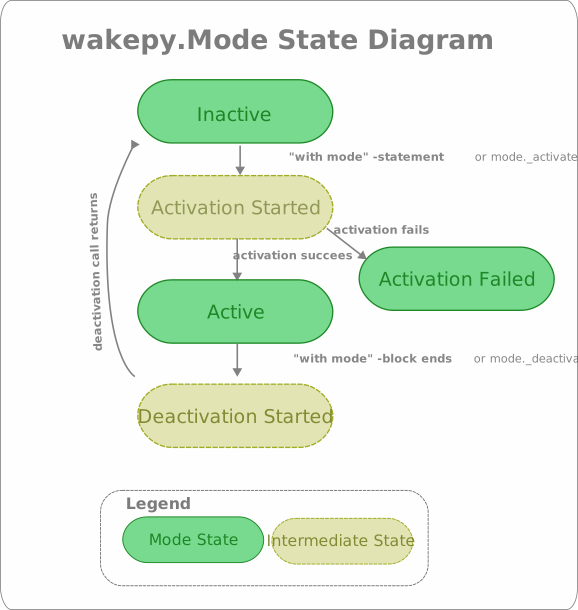
Fig. 1 The five states related to wakepy Modes#
Overview of the Mode Lifecycle#
In order to make it is easier to discuss about what is happening, we use the code from this code block and split the Mode initialization and activation in the context expression into two statements and add comments and line numbers:
 1from wakepy import keep
 2
 3# Returns an instance of Mode
 4mode = keep.running()
 5# Inactive
 6
 7with mode:
 8    # Active
 9    USER_CODE
10    # Still Active
11
12# Inactive
The above comments assume “the happy path” (the mode activation succeeds). Then, we compare the code with the actions in the Activity Diagram.
Mode Activity Diagram#
The wakepy.Mode Activity Diagram in Fig. 2 shows the Activities related to activating, working in and deactivating a mode. The arrows on left side show how these relate to python code. The States from Fig. 1 are marked between activities in cursive font, in light blue.
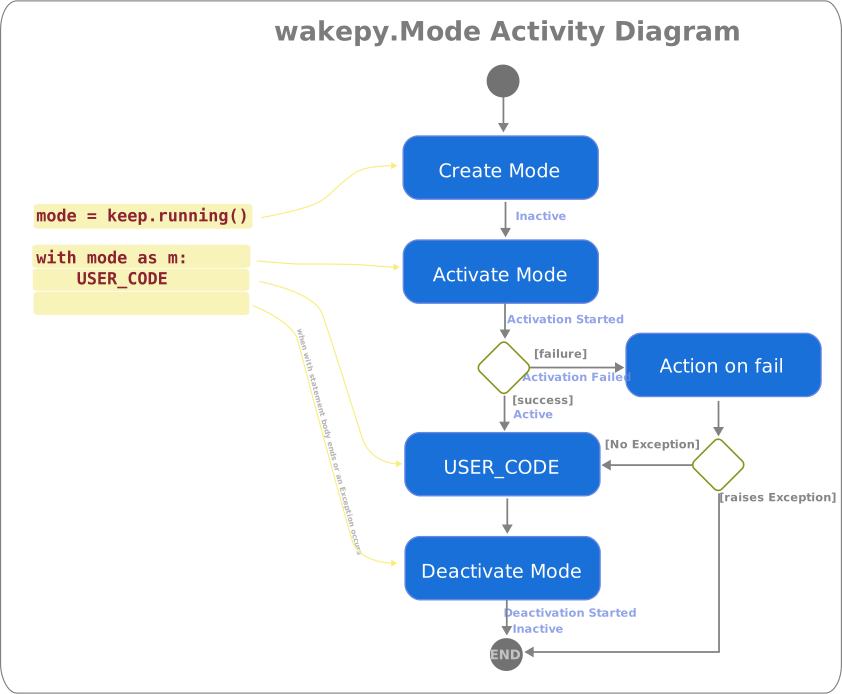
Fig. 2 The Activity Diagram related to activating and deactivating wakepy Modes#
Creating a Mode instance#
This corresponds to the action “Create Mode” in Fig. 2. When you create an instance of the wakepy Mode class with
1from wakepy import keep
2
3# Returns an instance of Mode
4mode = keep.running()
5# Inactive
the instance will initially be in the Inactive state.
Activating a Mode#
In order to set your system into a Mode, you need to activate it (“Activate Mode” in Fig. 2). As Modes are context managers it is possible to simply use:
 7mode = keep.running()
 8
 9with mode:
10    # Active
11    USER_CODE
This will put the Mode into Active or Activation Failed state through the intermediate Activation Started state. If the code is set to Activation Failed state, the Action on Fail occurs (See: Fig. 2). This action may be an exception or a warning.
Note
The above with mode:... is roughly equal to
mode._activate()
try:
    USER_CODE
finally:
    mode._deactivate()
The Fig. 3 presents an activity diagram from the “Activate Mode” step of Fig. 2. The steps are:
Prioritize Methods: In this step, methods are prioritized first with
methods_priorityfrom the user, if given. Then, the methods are prioritized using platform support information fromMethod.supported_platform.Activate with a Method: Try to activate the Mode using the Method with highest priority. This is explained in more detail in the next section. Note that only one Method is ever used to activate a Mode; the first one which does not fail, in priority order.
This process happens in the Mode._activate method and it returns an ActivationResult object, the used wakepy.Method instance (if successful) and a Heartbeat instance (if used).
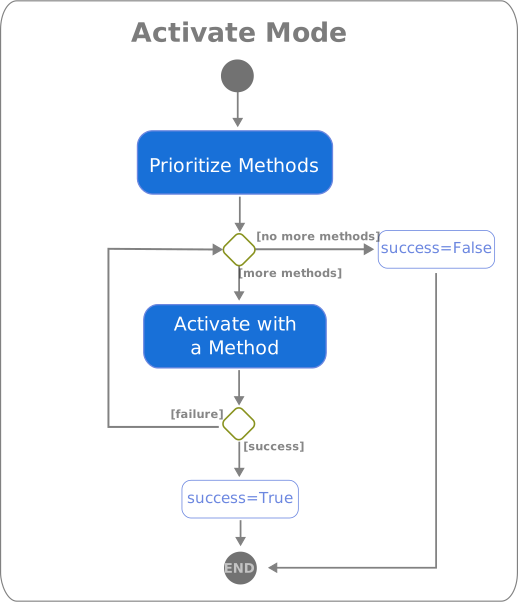
Fig. 3 The Activity Diagram for the “Activate Mode” action of the Fig. 2.#
Activate with a Method#
The Fig. 4 presents the activity diagram for the “Activate with a Method” action from the Fig. 3. This is what wakepy does with the Method:
Checks platform support against the list in the
Method.supported_plaforms.Checks requirements using
Method.caniuse(). Some Methods could require a certain version of some specific Desktop Environment, a version of a 3rd party software, or some DBus service running. During this step, if some 3rd party SW has known bugs on certain versions, the Method may be dismissed.Tries to activate the Mode using the
Method.enter_mode(), if definedTries to start the heartbeat using the
Method.heartbeat(), if defined.Starts the Heartbeat, if the
Method.heartbeat()exists. This will run in a separate thread.
Heartbeat is not yet supported
Heartbeat support is not yet fully implemented. Ticket: fohrloop/wakepy#109
If the first two steps do not fail, at least one of Method.enter_mode() and Method.caniuse() is defined and they do not raise Exceptions, the Mode activation is successful. This process happens in the activate_method function and it returns an MethodActivationResult object, and a Heartbeat instance (if used and activation was successful).
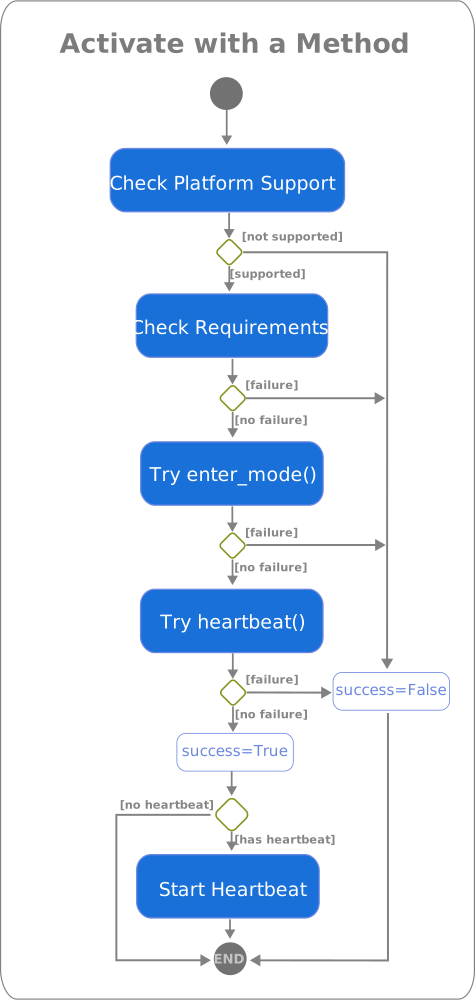
Fig. 4 The Activity Diagram for the “Activate with a Method” action of the Fig. 3.#
Staying in a Mode#
This part of the Mode lifecycle is where the user code (“USER_CODE” in Fig. 2) is ran. Sometimes this code could be just simple while loop with sleeps until KeyboardInterrupt, and sometimes it is some long-running task. During this activity, the Mode will be in Active or Activation Failed state (Fig. 1). If the used Method has a heartbeat() method, it will be called every Method.heartbeat_period seconds in a separate heartbeat thread.
Deactivating a Mode#
The “Deactivate Mode” activity in Fig. 2 occurs automatically when the with block is exited; between lines 10 and 11 in the code below:
 7with mode:
 8    # Active
 9    USER_CODE
10    # Still Active
11
12# Inactive
This is handled automatically by the context manager. What actually is called is Mode.__exit__() which in turn calls Mode._deactivate(), which triggers deactivating the used Method. Deactivating a Method means stopping the Method.heartbeat() calls (if heartbeat is used) and calling Method.exit_mode().
Note
When using the with statement, the context manager takes care of calling Mode._deactivate() if the USER_CODE raises an Exception.